Color theme
Sign inRequest beta access

ClickGuardIQ platform

Know what needs attention—and why.

A prioritized operating view for tracking readiness, traffic quality, business impact, and the next defensible action.

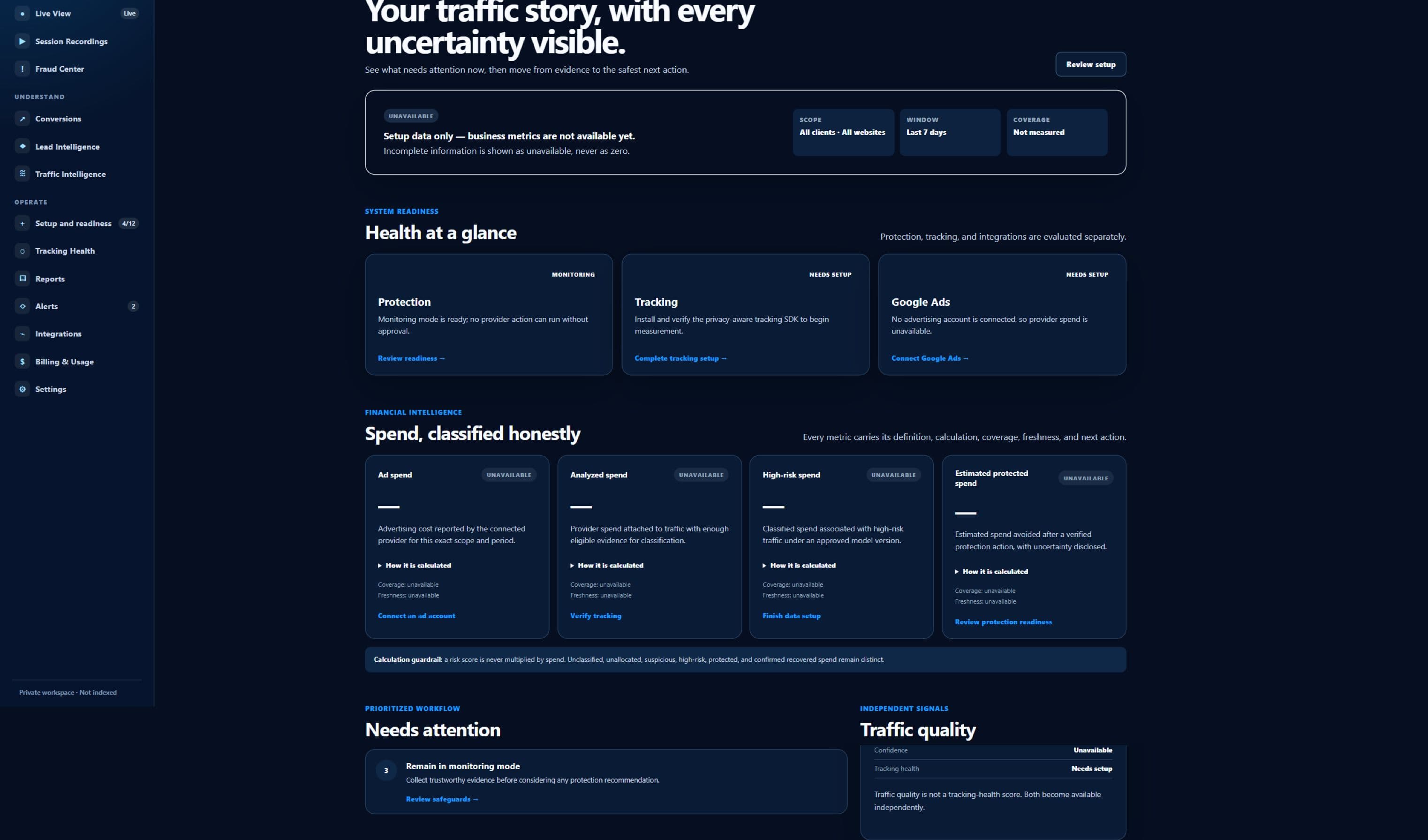
Sanitized beta interface — no customer data
Sanitized ClickGuardIQ Command Center showing setup readiness and unavailable business metrics.
Command CenterCurrent beta interface captured in a sanitized first-run state. Metrics are unavailable rather than fabricated.

A clearly owned job

Command Center has one defined place in the operating model.

The page explains what this surface measures, the decision it can support, and the boundary it does not cross.

The job this surface owns

Command Center is designed for operators and leaders who need to know what requires attention before they interpret business performance. Its primary record is a prioritized, scoped operating summary linked to readiness, traffic, incident, conversion, lead, integration, and delivery evidence. That focus matters because a useful operating surface should answer a specific question before it asks a team to act. Here, the question is whether a team can trust the current view, investigate a change, repair a blocker, or move to a governed action. The answer stays attached to the evidence and scope that produced it.

Every Command Center card is intended to disclose its website, time range, timezone, filter, freshness, availability, coverage, and comparison basis. That scope travels with summaries, filters, exports, and follow-up links so a number is not separated from the population it describes. When the required evidence is absent, the interface should say that the answer is unavailable or incomplete instead of replacing it with an estimate that looks authoritative.

  • Primary record: a prioritized, scoped operating summary linked to readiness, traffic, incident, conversion, lead, integration, and delivery evidence
  • Decision supported: a team can trust the current view, investigate a change, repair a blocker, or move to a governed action
  • Designed for: operators and leaders who need to know what requires attention before they interpret business performance

A deliberate evidence boundary

Command Center prioritizes readiness and attention; it does not turn an executive summary into a fraud verdict or hide missing inputs behind a zero. ClickGuardIQ preserves this distinction because a high-risk signal, an unusual pattern, a tracking defect, and confirmed invalid activity are not interchangeable findings. Each can change what an investigator checks next, but none should silently inherit the certainty of another.

A card should link to the exact module and scoped query that explains the change, preserving the return path to the operating summary. The operating record keeps source observations, calculated signals, human notes, decisions, provider responses, and verified outcomes attributable. Corrections create a history rather than rewriting the earlier state, which keeps later reporting and review understandable.

How it fits daily work

Cards fed by tracking streams, calculated signals, provider data, CRM state, and scheduled processing expose their own update time and completeness. This prevents a recent partial stream from being compared casually with a completed historical period. It also gives an operator a direct route to the underlying visitor, session, incident, conversion, lead, campaign, integration, or delivery record when more detail is justified.

Portfolio and client views respect delegated access, and sensitive visitor, security, provider, and commercial details are not exposed merely because a summary is visible. Access is therefore part of the product model, not an afterthought. Sensitive evidence, exports, provider actions, and administrative changes should remain limited to the appropriate website, client, role, and purpose, with an audit trail that explains who did what and when.

Feature detail

What Command Center is designed to help teams do.

Each capability keeps its underlying scope and limitations visible so convenience does not come at the expense of explainability.

Prioritize blockers first

Place broken tracking, consent conflicts, unhealthy connections, security requirements, and failed protection or delivery states ahead of ordinary optimization opportunities.

Learn more →

Read metrics in context

Pair every important total or rate with scope, freshness, eligibility, unavailable state, comparison period, and the path to its supporting records.

Separate operating domains

Keep tracking health, traffic quality, risk incidents, conversions, lead status, protection actions, and integrations visibly distinct even when they share one overview.

Move from summary to evidence

Open the relevant campaign, visitor, incident, conversion, lead, report, or integration state without reconstructing filters in another tool.

Learn more →

Preserve stable comparisons

Compare compatible periods and populations, disclose definition changes, and prevent partial current data from masquerading as a completed trend.

Create role-aware views

Give executives, analysts, investigators, agencies, and administrators the appropriate level of detail while retaining one governed source path.

Working situations

Use it when the next question needs evidence, not a guess.

These workflows describe practical investigation and operating needs; they are not promises of a particular savings, detection rate, or commercial result.

Morning operating review

Check blockers, freshness, unusual traffic-quality movement, open investigations, protection failures, and reporting delivery before discussing spend or outcomes.

Executive performance question

Answer why a headline number changed by opening its eligible population, source records, comparison definition, and known measurement limitations.

Agency portfolio triage

Identify which client workspace needs intervention without crossing identity or provider boundaries, then hand the scoped issue to the responsible operator.

Learn more →

Post-change verification

Review tracking, provider, conversion, and incident state after an approved change while keeping deployment, application, and verified effect separate.

A governed sequence

From a prioritized, scoped operating summary linked to readiness, traffic, incident, conversion, lead, integration, and delivery evidence to a defensible next step.

The workflow keeps observation, calculation, review, action, and verification separate so uncertainty and responsibility remain visible.

  1. 01

    Establish readiness

    Check installation, stream, consent, security, integration, and provider prerequisites for the selected property before loading business summaries.

    An unavailable card is not converted to zero.
  2. 02

    Assemble scoped cards

    Calculate each card from governed records with its own time range, eligibility, comparison, freshness, and availability metadata.

  3. 03

    Prioritize by operational impact

    Rank blockers and risks by affected evidence, business workflow, urgency, and permitted next step rather than by visual alarm alone.

  4. 04

    Open the evidence path

    Carry the selected property, dates, filters, and comparison into the relevant detailed module so the investigator sees the same population.

  5. 05

    Record and revisit

    Retain assignment, decision, repair, action, verification, and follow-up state so a summary does not reset the team’s operational memory.

Evidence and readiness

Understand the current product boundary before connecting traffic.

ClickGuardIQ is presented as a beta product. Interface evidence is sanitized, provider-dependent capabilities require validation, and unsupported proof is not substituted with generated claims.

Public captureavailable

First-run interface state

The Command Center image shows setup guidance and unavailable metrics rather than fabricated customer performance.

Metric contractbeta

Context-bearing summaries

Scope, freshness, coverage, and availability are architectural requirements; individual beta metric readiness must still be validated.

Portfolio operationlimited

Delegated boundaries

Client and property scoping are part of the model, while complete agency provisioning and migration remain beta-fit questions.

Proof standardplanned

No invented dashboard success

The page does not display fictional savings, blocked-click totals, conversion lifts, or benchmark deltas to make the dashboard look populated.

A more useful comparison

Evaluate Command Center by its operating behavior.

This table compares two operating approaches. It does not claim that every alternative product follows the same design or lacks the same controls.

Evaluate Command Center by its operating behavior.
ComparisonHeadline dashboardEvidence-led Command Center
Unavailable dataMay appear as zero, blank space, or an unexplained missing widget.Uses an explicit unavailable state with the reason and permitted setup path.
PriorityLargest percentage change can dominate regardless of data health.Measurement, security, provider, and delivery blockers can take priority over opportunity cards.
Drill-downOpens a generic report that requires filters to be rebuilt.Carries the card’s property, period, population, and comparison into supporting evidence.
ComparisonMay compare partial current data with a complete prior period.Discloses completeness and only presents a trend when populations are compatible.
Action stateA requested change can be summarized as protection completed.Attempted, applied, verified, failed, and reversed states remain visible.

The ClickGuardIQ operating standard

Context remains attached from first observation to final review.

Three controls make the page useful for investigation, governance, and later audit without turning one screen into an unsupported verdict engine.

Scope, eligibility, and freshness

Every important result in Command Center should identify the website or client boundary, time range, timezone, filters, eligible population, excluded population, and last successful update. Cards fed by tracking streams, calculated signals, provider data, CRM state, and scheduled processing expose their own update time and completeness. A result that cannot disclose those conditions should not be used as if it describes the whole account.

Eligibility is especially important when consent, sampling, integration coverage, event validation, identity state, or provider availability changes what ClickGuardIQ can measure. The interface should reveal those gaps at the point of use and preserve them in reports or exports. That makes an incomplete answer operationally useful without pretending it is complete.

Reasons, versions, and corrections

A card should link to the exact module and scoped query that explains the change, preserving the return path to the operating summary. Calculated outputs retain their model, rule, or score version and the eligible evidence available at calculation time. A later recalculation is a new state with a reason, not a silent edit to history. Operators can therefore distinguish what the system observed from what it inferred and what a person later decided.

The same discipline applies to corrections. Identity merges, conversion reconciliation, qualification changes, incident decisions, and provider responses may alter a current view. ClickGuardIQ should keep the earlier record attributable, show the correction source, and rebuild affected summaries from governed records rather than from an unexplained overwrite.

Permissions, actions, and proof

Portfolio and client views respect delegated access, and sensitive visitor, security, provider, and commercial details are not exposed merely because a summary is visible. A recommendation is not an attempted action; an attempt is not a provider-applied change; and an applied change is not a verified outcome. Those states remain separate wherever this surface can contribute to protection, notification, export, or downstream delivery.

This page does not use invented testimonials, customer logos, benchmark statistics, or savings percentages as product proof. The product image is either a sanitized beta capture or clearly labelled conceptual artwork. Commercial evaluation should instead begin with fit, data readiness, provider capability, policy requirements, and the evidence a team needs to verify its own outcome.

Command Center questions

Clarify the boundary before making a decision.

These answers describe the intended beta operating model and avoid claiming an integration, outcome, or automation that has not been validated.

What appears in Command Center before setup is complete?

It should show the selected workspace, setup requirements, readiness blockers, and explicit unavailable states. It should not create plausible-looking traffic, spend, incident, conversion, or savings numbers simply to populate the layout.

Is Command Center the source of truth for every metric?

It is an operating summary built from governed records. The detailed source remains the relevant tracking, traffic, visitor, incident, conversion, lead, provider, or delivery record, and each card should link back to that evidence.

How are urgent items prioritized?

The intended order considers data readiness, security, connection health, failed actions or deliveries, affected scope, business impact, and the next permitted remediation. A visually dramatic percentage should not outrank evidence that makes the dashboard unreliable.

Can executives and investigators see different detail?

Yes in the intended role-aware model. Executives can receive concise status with scope and limitations, while authorized investigators can open sensitive evidence. Exact beta roles and delegated client access should be validated for the organization.

Does a Command Center alert prove fraud?

No. A card can identify a risk change, incident, or unusual pattern that deserves review. Confirmation depends on eligible evidence, confidence, investigation, policy, and the recorded decision; tracking defects remain a separate domain.

Can a team export the same view?

Exports are intended to retain the property, period, filters, metric definitions, freshness, completeness, and generation time. Available formats, scheduling, and audience permissions should be confirmed during beta evaluation.

Evidence before activation

Start with the operating questions your team must answer every day.

Describe the properties, roles, priority signals, evidence sources, and escalation paths you need. The beta review will map them to current summary, drill-down, and readiness behavior.